Report and classify bugs
Create structured bug tasks with reproduction steps, actual results, expected results, severity, and priority.
Before you begin
Enable Bug reporting in Board settings → Features and use an account that can create tasks.
Planning your workflow
A bug report should allow another person to reproduce the failure without asking for missing context. Record the starting conditions, the sequence of actions, the actual result, and the expected behavior. Mention the environment or test data when it affects reproduction. Screenshots show visible symptoms, while the written steps explain how to reach them.
Agree on severity definitions within the team. A blocker might prevent an essential workflow entirely, while a minor issue may leave the workflow usable with a visible defect. These are team classification examples, not automatic application rules. Priority is a separate planning decision: a low-impact defect may still be urgent before a release, and a severe issue may need investigation before its delivery plan is clear.
Example
Title: Expired card is accepted. Steps: open checkout, enter an expired test card, and submit payment. Actual: the page displays payment success. Expected: the payment is rejected with a clear validation message. Add a screenshot and classify severity and priority according to the team's release criteria.
Step-by-step tutorials / 1
Create a reproducible bug report
Open the board's bug-report action. Enter a short title describing the observed failure and add context in the description.
Write the exact reproduction steps, then describe what actually happened and what should have happened.
Choose a severity and priority. Select assignees and a due date when appropriate, and attach screenshots or supporting files.
Submit the report and open the created Bug task to check its fields and track follow-up work.
What to expect: The bug contains enough evidence for another team member to reproduce and investigate it.
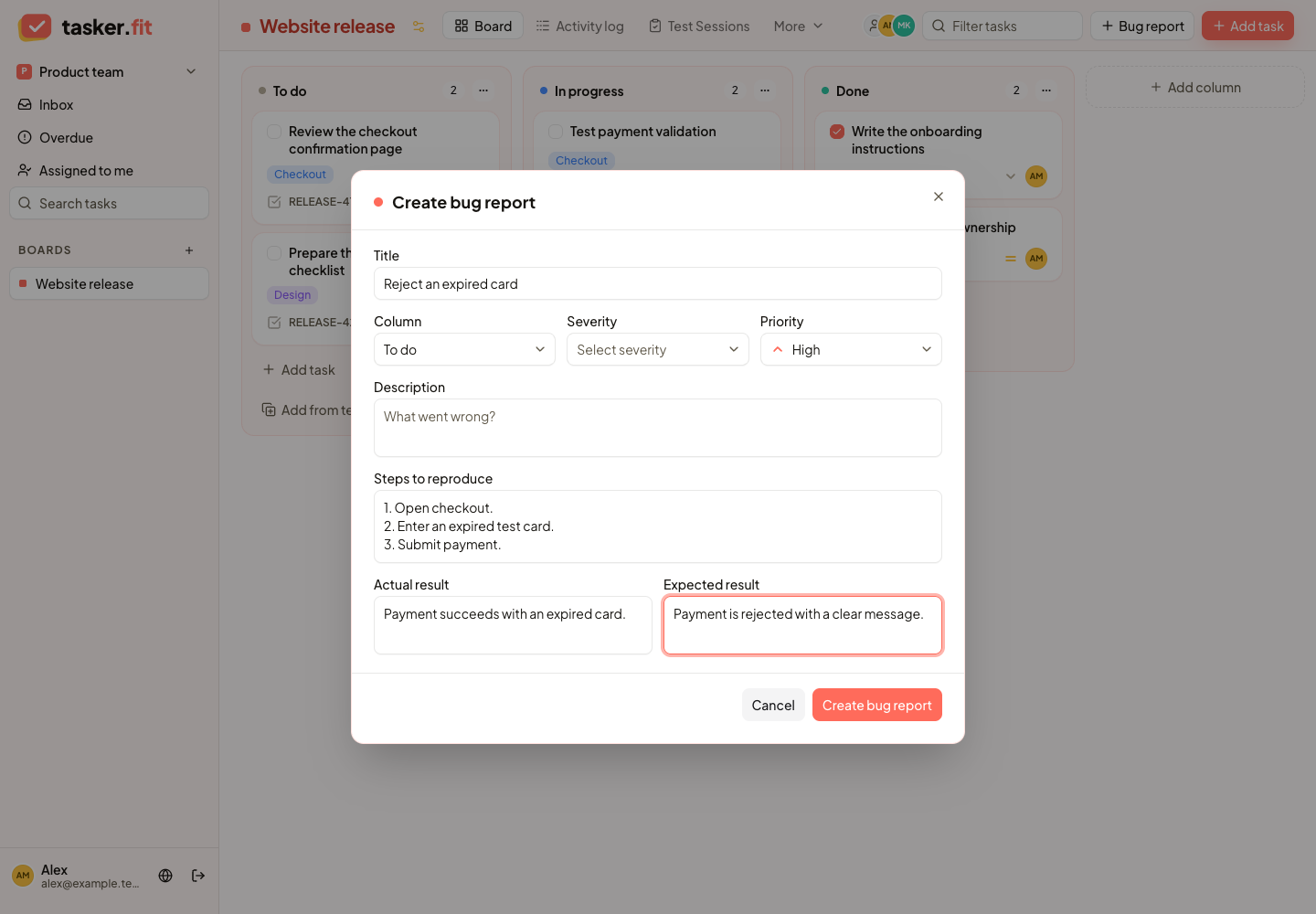
Capture a reproducible bug
Actual Tasker.fit interface with fictional demo data. No production customer data is shown.
Feature reference
Structured standalone bug reports
Create a bug task using a dedicated reporting dialog when the board's bug-report feature is enabled. The form supports a title, description, reproduction steps, actual and expected results, severity, priority, assignment, attachments, and a due date.
Bug severity classification
Classify a bug as Blocker, Critical, Major, Minor, or Trivial. Severity records the impact of a defect separately from its task priority.
Tips & troubleshooting
- Severity describes the defect's impact. Priority describes how urgently the team should address it. Use both rather than treating them as the same field.
- Bugs discovered during a test session should be reported from the session case card to preserve the QA-to-task link.
Frequently asked questions
Is severity the same as priority?
No. Severity records impact; priority records urgency. Tasker stores both so a team can make independent triage and scheduling decisions.
Should I use the board report form for a failed test case?
Report it from the case inside the session when it was discovered during QA. That workflow creates the link between the case result and its Bug task.